Real-time agent assist: what AI reply drafts should and should not do for support teams
Agent assist is useful when it drafts and a person decides. This guide covers where the line sits, how to review a draft quickly, and what to ask a vendor before your conversations reach its model.
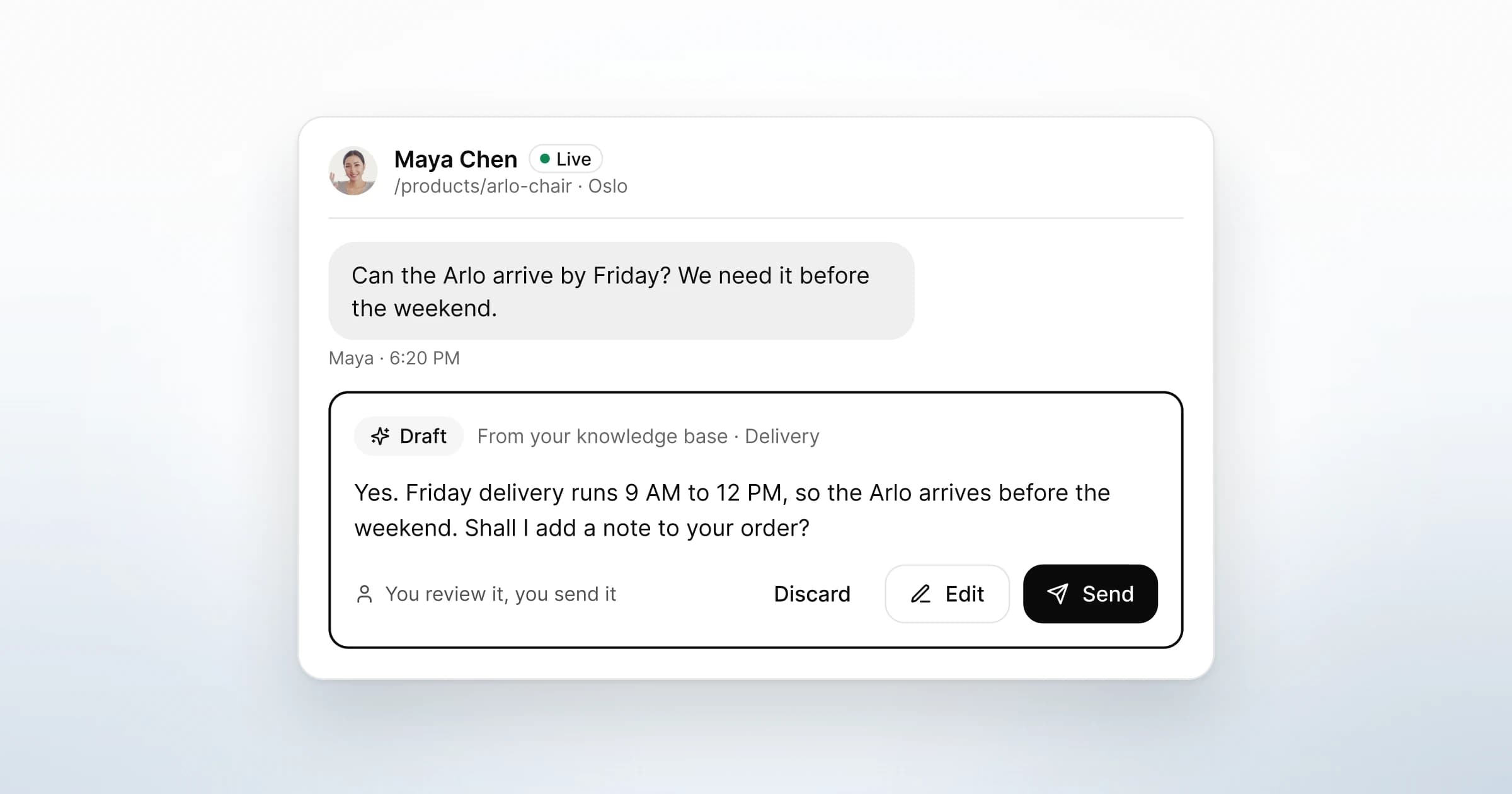
Agent assist is software that helps a person on your support team during a live conversation. It reads the thread, suggests a reply or the right piece of knowledge, and leaves the decision to the person. Real-time agent assist does this while the customer is still waiting, inside the tool your team already answers from.
The short answer: agent assist should draft and a person should decide. It earns its place when it turns your own knowledge into a first version your teammate can check quickly. It causes harm when it sends on its own, fills gaps with guesses, or talks to the visitor as if it were your team. Below is where to draw that line, how to review a draft, and what to ask a vendor about privacy.
What is agent assist, and how is it different from a chatbot?
The difference is who sends the reply. A chatbot answers the visitor itself. Agent assist answers your teammate, who then answers the visitor.
Google Cloud uses the same split for its own product. Its documentation says "Agent Assist supplies real-time document and response suggestions to the human agent that are relevant to the conversation" (Google Cloud, Agent Assist basics).
| Chatbot | Agent assist | A person writing alone | |
|---|---|---|---|
| Who sends the reply | Software | A person, after reading a draft | A person |
| What the visitor talks to | A bot | Your team | Your team |
| Strongest at | One correct answer, at any hour | Repeated answers that still need a check | Judgement, complaints, edge cases |
| Typical failure | Confident wrong answers, loops | A teammate who stops reading the drafts | Slow replies to the same question |
| Who answers for a mistake | Your business | Your business | Your business |
The last row is the same in every column. In Moffatt v. Air Canada, the tribunal said a chatbot "is still just a part of Air Canada's website". It added that "it makes no difference whether the information comes from a static page or a chatbot" (Civil Resolution Tribunal, 14 February 2024, paragraph 27). A draft that a person reads first is a chance to catch the error before a visitor relies on it.
For the wider choice between the two, see live chat vs chatbot: when a person should answer.
What should real-time agent assist do?
Good agent assist does the slow, repeated part of a reply and hands over a version a person can judge quickly. Five behaviours separate a useful tool from a risky one.
- Draft from the thread and your own knowledge. The draft should answer the question the visitor asked, on the page they asked it from. It should use what your team has written down, rather than what the model knows about chairs in general.
- Put the draft where the reply is written. A suggestion in a side panel is easy to ignore. A draft in the composer, clearly marked as a draft, is one read away from being sent.
- Make the decision cheap. Send, edit or discard should each be one step. If discarding is awkward, people send drafts they should have binned.
- Stay inside approved sources. When your delivery page changes, the draft should change with it. A tool that blends your knowledge with its own guesses cannot be checked.
- Help after the conversation too. Summarising a long call for the next teammate is the same job: a first version that a person corrects.
What should agent assist not do?
It should not put software between your visitor and your team without anyone noticing. Four boundaries matter.
Send on its own. Watch for settings that send a draft after a delay, or whenever the model rates itself as confident. Each one turns agent assist into a chatbot by another route, with the same accountability.
Guess facts. Dates, stock, prices, delivery windows and policy terms have one right answer, and it lives in your systems. A draft should leave a gap or say it does not know, rather than invent a plausible number. The OWASP project for LLM applications warns that models "may produce answers that sound correct but are completely unfounded" (OWASP, LLM09:2025 Misinformation).
Answer the visitor as a bot. If software talks to the visitor directly, the visitor should know. Article 50(1) of the EU AI Act covers AI systems "intended to interact directly with natural persons". They must be designed so people are told they are interacting with an AI system, unless that is obvious (AI Act Service Desk, Article 50). That article applies from 2 August 2026 (Article 113). A draft a person sends is a different setup, but check how the rules apply to yours. This is not legal advice.
Decide things about the visitor. Refunds, exceptions and anything with money attached are your team's calls. A draft can set out the policy; a person applies it.
| Good sign in a tool | Warning sign |
|---|---|
| Drafts appear in the composer, marked as drafts | Replies go out on their own when the model is confident |
| Drafts use only your knowledge and the current thread | Drafts mix in general web knowledge you cannot see |
| A wrong entry is fixed once, and drafts follow it | Every wrong answer has to be corrected in the chat |
| The vendor states where the model runs and whether it trains on your data | Data use is described only as improving the service |
| Discarding a draft is one step | The draft is the default and writing your own is extra work |
How should your team review an AI draft before sending it?
Read the question first, then the draft. If you read the draft first, it frames what you expect the visitor to have asked, and the gaps get harder to see.
OWASP calls this failure overreliance, when people "place excessive trust in LLM-generated content, failing to verify its accuracy". Its advice is "human oversight and fact-checking processes, especially for critical or sensitive information" (OWASP, LLM09:2025). In a support team, that process can be seven short checks.
- Reread the visitor's message and the page it came from. Does the draft answer this question, or a nearby one?
- Check every fact that could be wrong. Numbers, dates, product names, delivery windows, policy terms. Find each one in the knowledge base or the order. If you cannot find it, take it out.
- Strike promises you cannot keep. "Shall I add a note to your order?" is only a good line if someone can actually do it.
- Make it sound like your team. Shorten it, use the visitor's name, and cut any line nobody on your team would say. Our guide to live chat scripts and greetings covers the voice.
- Ask before guessing. If you are unsure, ask a colleague privately in the thread rather than sending a hedge.
- Discard when fixing takes longer than writing. Throwing a draft away is a normal outcome.
- Fix the knowledge entry behind it. If the draft was wrong because a knowledge entry was out of date, update the entry. Otherwise the same error returns tomorrow.
When to write from scratch
Some conversations should not start from a draft at all. Complaints, disputes, refunds, anything legal or medical, and a visitor who is clearly upset all need a reply written for that person. A polished draft can read as indifference when someone is angry.
How to tell whether drafts are helping
Track it by hand for a week; you do not need a dashboard. For each draft, note whether it was sent unchanged, edited or discarded, and why. If most are discarded, fix the knowledge base before blaming the model. If most are sent unchanged, spot-check a few, because unchanged drafts can also mean nobody is reading them closely.

What privacy questions should you ask an agent assist vendor?
Ask where your conversations go, who can read them, and whether they train anything. Agent assist only works by sending the thread and your knowledge to a model, so the answers matter as much as the drafts.
| Ask the vendor | Why it matters | A clear answer sounds like |
|---|---|---|
| Where does the model run, and who hosts it? | Visitor messages often contain personal data, and location shapes your transfer questions | A named hosting region and provider, in writing |
| Is our data used to train models, ours or anyone else's? | Training can carry your customers' words beyond your account | A plain no, or a setting you control |
| What does a draft read? | A wider view means more data per request | Your knowledge base and the current conversation, nothing hidden |
| Can the AI send, decide or change anything on its own? | This is the line between assist and automation | No: a person sends every message |
| Which sub-processors handle the data? | A processor "shall not engage another processor without prior specific or general written authorisation of the controller" (GDPR Article 28(2)) | A published list, and notice before changes |
| What happens to our data when we leave? | Article 28(3)(g) has the processor delete or return it at the end of the service, at the controller's choice | A DPA clause that says which, and when |
| If we connect our own AI tools, what can they reach? | Exports and integrations are where data leaves quietly | Scoped, read-only access you can revoke, with a log |
Read the answers against the vendor's DPA and privacy policy, not only its sales pages. This is not legal advice; your data protection lead or adviser should make the final call.
What does GreetDock's AI do?
GreetDock's AI drafts for your team and never answers visitors. It does three things, and each one ends with a person. AI reply drafts, call transcripts and summaries are switched on for each workspace from 4 November 2026, after notice under our DPA.
Reply drafts in the inbox. When a visitor writes, GreetDock can draft a reply from your knowledge base and the conversation so far. The draft appears in the composer, marked as a draft. A teammate reviews it, edits it and sends it, or discards it and writes their own.
Drafts use only what is in your knowledge base and the current conversation. When an entry changes, drafts follow the latest version. AI drafts are part of the private beta, and how they are triggered may still change. See how drafts fit the thread in GreetDock's inbox.
The review steps above map onto the inbox. Every visitor message carries the page it was sent from. A teammate can mention a colleague in a private team note that the visitor never sees. And Cloud search across names, emails and message text shows how a question was answered before.
Call transcripts and AI summaries. Calls are never recorded automatically. When a teammate starts recording, GreetDock saves a transcript and a short AI summary to the visitor's record. The summary is a draft for your team to read, edit or ignore. If you record, tell visitors that a transcript and summary are created.
Read-only access for your own AI tools. GreetDock runs an MCP server, so tools such as Claude, ChatGPT or Cursor can read your records. Access is read-only: no tool can send messages, change settings or delete anything. Each client uses a token you create, scoped to conversations, transcripts or visitors. Every request lands in the token's request log, and you can revoke a token at any time. Data your own tool reads leaves GreetDock under your control and that provider's terms. Our page on AI call summaries and read-only MCP access shows the setup.

On the privacy questions: AI processing for drafts and summaries runs on an EU-hosted model, and customer data is not used to train models, by us or by the AI provider. Hosting is described on our security page, and our GDPR and live chat guide names the AI sub-processor and the date it starts. The current Subprocessor Register is available on request. When the service ends, your data is returned or deleted under the DPA.
What it does not do: there is no bot that answers visitors, and every message a visitor receives is sent by a person. If you want software to answer customers before a person steps in, GreetDock is the wrong tool. Our comparison with Intercom says when Intercom is the better choice.
What to do next
- Write down your boundary in one sentence: who sends replies, and which topics never start from a draft.
- Pick the ten questions your team answers most, and check that each has a short, current knowledge entry.
- Agree the seven review steps with your team, and try them on a week of drafts.
- Log sent, edited and discarded drafts by hand for that week, then fix the entries behind the discards.
- Send the privacy questions above to any vendor you are considering, and read the replies against its DPA.
GreetDock is in private beta with a free 30-day trial, no card and no automatic charge. If drafts that a person sends are how you want AI in your inbox, get early access.